Pages: Prev 1 2 3 4 5 [6] 7 8 9 10 11 ... 21 Next   Go Down
  Print  
Author Topic: building usb-remote-cable  (Read 47444 times)
0 Members and 1 Guest are viewing this topic.
stevodude
Rookie
*
Offline Offline

Posts: 8


« Reply #75 on: 11 / April / 2008, 05:53:54 »

well I worked out the s5is doesn't  work with less than 3.3v, as I tried a usb cable with a button lithium with 3.3v no load, and wouldn't detect with the script running.
Chassed around the deep dungeon of my desk and found an old pc front case reset switch/led, 3 1.5v AA batteries, and an old clear plastic case, and hacked off the end of a usb-usb extension lead.

hahaha, skip that, found this: CameraFeatures - CHDK Wiki

and stated 3.7v needed, so wacked 3x1.5v together and baboomba, works a tread... AWSOME?!!!!!!!.....

mkII remote usb RTA with bits found in my workshop. (PCD is an old front panel from a computer case, with led and micro switch all ready cabled up :-)


Assembled ready to go.


Button press makes led light up :-) mmmmmm  led's....


and it works. but the script seems to do something first, like focus etc then takes a shot, ie about 1.5seconds...
Wonder if there is a way to capture instantly, is pre focus, zoom, set settings, run remote script and then snap.? maybe questions for another thread, but I can't create threads atm...
Logged
Barney Fife
Hero Member
*****
Offline Offline

Posts: 1159


« Reply #76 on: 11 / April / 2008, 10:34:03 »

Deleted
« Last Edit: 22 / April / 2008, 22:16:41 by Barney Fife » Logged

[acseven/admin commented out: please refrain from more direct offensive language to any user. FW complaints to me] I felt it imperative to withdraw my TOTAL participation. Nobody has my permission, nor the right, to reinstate MY posts. Make-do with my quoted text in others' replies only. Bye
photoscott
Rookie
*
Offline Offline

Posts: 15


« Reply #77 on: 11 / April / 2008, 20:56:56 »

Here is another idea for a wired and wireless remote in one.  I purchased a Skylink garage remote from Radio Shack. It needs a 12V power supply for the receiver, and you also need to provide 3-5V to the USB port.  I used a 8xAA battery holder for the 12V, and soldered some wires to the leads for 3 of the batteries to give me 4.5-4.8V.
The Skylink unit basically closes a set of contacts but doesn't push any voltage through them.  You can trigger via the button on the receiver, or with the small remote transmitter.  It couldn't be easier!  The remote unit cost $20.  The battery holder was $2.
I now have a compact wired and wireless remote.  I haven't tested the distance yet, but I would suspect that it is at least 70-80 feet.
Now I just need to buy an S2 IS to go with my SD850.  Anyone have one for sale?  Roll Eyes

So how did you wire the receiver end to your power and USB? I am doing your design with a twist. I am adding a Canon RS60 E3 switch to the transmitter via 1/8" female jack so I can get the locking feature and enable the autofocus with the half way press of the button. I am just curious did you wire one of each of the receiver wires to the red and white wires of the USB cable? You can't see the wiring route with the heat shrink. I know it says in the manual for the remote that the wires coming off the transmitter are parallel, so that is why I am curious to how you wired it. With having the provided controller as your trigger, does it allow you to enable auto  focus or does it just release the shutter without focusing?  I really like your idea, that is why I follow but being the creative type like to add my touch.
Your reply would be very appreciated or if any else knows how this wiring schematic looks could you please post. I would love to use this with my Canon A570 IS.
Thank you from the somewhat electrically challenged hobbiest.
Scott
« Last Edit: 11 / April / 2008, 21:00:55 by photoscott » Logged
photoscott
Rookie
*
Offline Offline

Posts: 15


« Reply #78 on: 11 / April / 2008, 21:16:16 »

Check the UBASIC/TutorialScratchpad - CHDK Wiki page and look at the differences between shoot and click/press/release "shoot_half" / "shoot_full" commands. The most simplest USB-Remote scripts only use the shoot command. Using more elaborate script commands is how you get more control over your camera with CHDK. CHDK is not meant to be used just by itself (though it can be, with limits). It's a system of both scripting and the CHDK operating system.


So does that mean a script can be written for the usage of external microphones through the USB port? Does scripting affect the 3.5mm jack at all?
Just getting my feet wet here and liking it.
Thanks for the useful info Barney.

Scott
Logged
Barney Fife
Hero Member
*****
Offline Offline

Posts: 1159


« Reply #79 on: 11 / April / 2008, 22:28:57 »

Deleted
« Last Edit: 22 / April / 2008, 22:17:04 by Barney Fife » Logged

[acseven/admin commented out: please refrain from more direct offensive language to any user. FW complaints to me] I felt it imperative to withdraw my TOTAL participation. Nobody has my permission, nor the right, to reinstate MY posts. Make-do with my quoted text in others' replies only. Bye
wrybread
Rookie
*
Offline Offline

Posts: 15


« Reply #80 on: 29 / April / 2008, 04:43:24 »

I just built a wireless USB button using really simple parts. A quick description:

I used this cheap wireless doorbell so the range is about 100 feet, though I haven't tested the range yet: ACE TRADE- HEATH ZENITH        AC6150 CHIME DOOR WIRELS OFFWHT . I like it because both the button and the receiver are battery powered. I bought it at a local Ace Hardware (ubiquitous in San Francisco) for $19. Note that its the same doorbell as this one, but rebranded: Hacker's Bench : Wireless Doorbell Hacking


Remove the speaker, then put this relay across the speaker wires: RadioShack.com - Cables, Parts & Connectors: Component parts: Relays & transformers: Compact 5VDC/1A SPST Reed Relay


Now when you press the button the relay should be triggered. Note that until I removed the speaker, the doorbell didn't produce enough current to trip the relay.

Now your wireless button can trigger any external switch.

For the camera part:

I used this voltage regular, as suggested by a previous poster: RadioShack.com - Cables, Parts & Connectors: Component parts: Transistors & analog ICs: +5V Fixed-Voltage Regulator 7805


Connect a 9v battery to the voltage regulator's input (positive line of the battery to the input pin, negative to the ground). Obviously one of those 9v battery sockets from Radio Shack (a bag of 5 costs $2) is handy here.

Then splice a USB mini cable. Mine had 4 wires: red, black, green and white. USB mini has 5 contacts, one of which usually isn't used; two are data; two are power. You want to connect the positive power (in my case, that was the red wire) to the output pin of the voltage regulator, and the negative power (black wire) to the ground of the voltage regulator.

Obviously you should figure out which pin on the USB cable goes to which wire. I used this chart and a multimeter's continuity mode: Tech Info - USB & Firewire
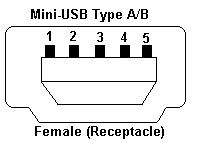


Now connect the output pins of the relay in-line with the output from the 9v battery, so when the button of the doorbell is pressed, the voltage regulator gets 9v power, which sends 5v to the camera, which makes the camera do whatever you want it to do.

Remember to enable the USB button in your firmware.

Here's a crappy picture before I put everything back together.
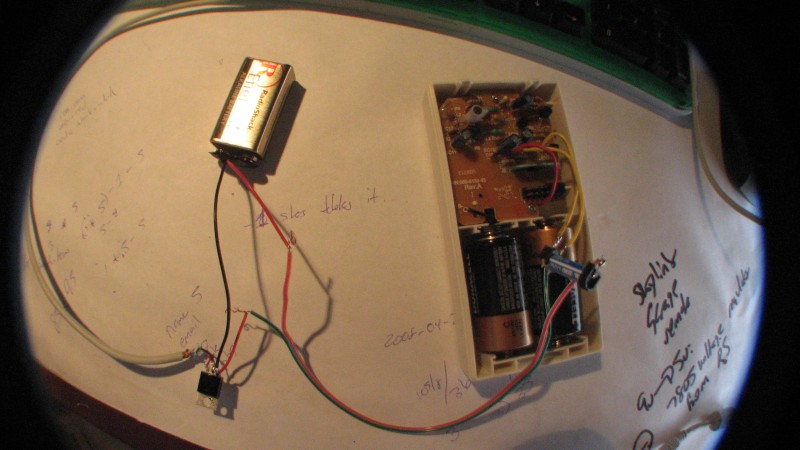


I should note that the link at the beginning of this post to the guy hacking the wireless doorbell is a more complicated circuit and probably much more correct. But mine works just fine for my purposes.

Here's a basic script to test it out. I'm using AllBest, not sure about other builds:

Code:
@title Remote Button
while 1
  wait_click 1
  if is_key "remote" then shoot
wend

end

Here's my timelapse script that has a couple of nice features:

- shoots a picture every X seconds
- prints how many seconds remain until the next picture is taken
- if the USB button is pressed, it takes a picture and resets the countdown for the timelapse. Handy for emphasizing certain moments in your timelapse.

Code:
@title Timeless Lapser
@param a Interval (Seconds)
@default a 10

print "Timeless Lapser!"


rem shot counter
b=0

:looper

b=b+1
cls
print "Shot ", b
print "0 seconds until next"
shoot

rem routine to pause in a way that will show countdown on console
x=0

:pauser
r=a-x
x=x+1
cls
print "Shot ", b
print r, "seconds until next"

   wait_click 1000
   if is_key "remote" then x=a

if x < a then goto "pauser"

goto "looper"

Feel free to email me with any questions, wrybread at gmail dot you know what.

Edit: I've since made the modification from that "hacker's workbench" page, and it indeed works better than my simpler mod. It simply involves shorting one of the resistors, and installing a single capacitor, and the unit is much more responsive now.
« Last Edit: 16 / May / 2008, 19:56:00 by wrybread » Logged
A630Lover
Full Member
***
Offline Offline

Posts: 115


« Reply #81 on: 29 / April / 2008, 14:02:11 »

Here is another remote control. I used an old Sony battery pack, a female (and male on the cable) 3,5 mm jack, a red led ,a little switch and a rechargeable 3v lithium battery. Cost: 0. Everything is reused material.


* IMG_6913.jpg (143.86 KB, 640x480 - viewed 129 times.)

* IMG_6914.jpg (133.62 KB, 640x480 - viewed 114 times.)
Logged
PhyrePhoX
Global Moderator
Guru Member
*****
Offline Offline

Posts: 2265


make RAW not WAR


« Reply #82 on: 29 / April / 2008, 14:41:48 »

okay, after seeing all these new fancy remote controls i thought i'd finally share mine:

here it is. well, it certainly isnt fancy, but it sure does its job.
built out of a cheap "dog control leash" (dont worry, no hurtin to the puppies!!!). atm i can connect two cams to it, planning to add 2 usb ports though, as i will have the chance to gather 4 powershots and do "mini matrix bullettime action" Big Grin
the usb ports are soldered to where the "vibrating motor" (english?) was before, 3 volts output - to my liking.
the second button on the remote control triggers the usb ports now. the first (bigger) button was and is controlling a small speaker which beeps when pressed. this actually is fun to do because in groupshots this way you are garantueed to get smiling (surprised?) faces.
the case itself is made in a way that it allows to be attached to a leash (the case is dirty on my pics as i had tape around it, took it off for pics and to solder the other ports to it).this makes it easy fixing it to a lamppost or a tree or even to the camera itself, by just using a leash (well, if you dont own a dog you can take your belt Big Grin j/k). 

hm, matrix bulletttime, did anybody ever try to sync more than two powershots, i mean here, in this forum? anywhere else? i mean SDM - fine, but thats been optimized for 2 cams (i guess i can sync 4 cams, no doubt!). but i havent seen any "results" yet. theres gotta be a techguy among you who owns a photo store and has all the equipment to create a professional bullet-time environment, eh? imagine high-speed synched pictures.


* IMG_4664.JPG (93.81 KB, 693x733 - viewed 63 times.)

* IMG_4665.JPG (31.6 KB, 484x450 - viewed 44 times.)

* IMG_4666.JPG (84.92 KB, 922x646 - viewed 68 times.)
Logged

databoy
Guest
« Reply #83 on: 02 / May / 2008, 03:51:35 »

The use of 5 volt regulators in dropping a voltage from 9 volts to 5 volts has to be approached with caution.

REFERENCE:

www.national.com/appinfo/power/files/f4.pdf

The above PDF document is a technical document from National Semiconductor one of the main manufacturers of regulators.

According to the document, the use of a 5 volt regulator to drop the voltage to 5 volts for the USB cable is operating outside the manufacturer's design parameters.

Page 18 addresses the issues of applications of regulators. Regulator circuits may oscillate if the bypass capacitors are not selected properly.

It would be advisable to download and read the document carefully. The long term effects of using a 5 volt regulator in the USB cable is unknown. It may operate without problems. You may be the unlucky one who purchases a 5 volt regulator which exhibits parasitic oscillations and places above 5 volt spikes on your USB cable.

The internal electronic design of Canon cameras is an unknown quantity. The USB cable is  operating outside Canon's manufacturing parameters. You may be the unlucky one who finds out that a parasitic oscillation has damaged the USB interface.

My advice is do not use any equipment which uses a voltage higher that 5 volts on your camera. 3 volt remote door bells are cheap enough. Use one of the designs posted on the forum.

We all live on different parts of the planet. Ultimately whatever you choose as a USB remote has to be sourced from locally supplied components. It may be beneficial for everyone if the moderators can document all the USB cable ideas as a sticky or transfer them to the wiki with technical links to application notes.       
« Last Edit: 02 / May / 2008, 03:59:13 by databoy » Logged
vine
Full Member
***
Offline Offline

Posts: 124


A560


« Reply #84 on: 02 / May / 2008, 11:51:10 »

I have used the 7805 for ages in various applications, a USB charger in my car among other things. I never had any trouble. Not to say your experience might differ, just sharing my two cents here. However when you look at the USB implementation on many cheap computer mainboards these days you'd image most USB devices have a rather high tolerance to voltage spikes.
Here is one of my remote boxes:

Material:
-USB-A jack, for example: ASSMANN A-USB-A-TOP
-pushbutton of your choice, for example: SCHURTER 0041.9141.1.1.0.1
-5V voltage regulator, for exampe: ESTEK ELECTRONICS 7805B
-9V battery and matching battery connector
-some sort of casing, for example: KEMO G01B
-circuit board and some cables, solder
-5V LED, for example: KINGBRIGHT L-934GD-5V (optional)

Tools:
Soldering iron, knife or drill to cut openings in the casing
How to build:
Connect all components according to the following schematic:


Logged

my photo map

my chdk page with tutorials, scripts and more

>> finally back from vacation (was a bit longer than intended) <<
Aristoc
Jr. Member
**
Offline Offline

Posts: 52


« Reply #85 on: 03 / May / 2008, 20:58:19 »

Those are nice photos and schematic but I am wondering if you took any photos of how you soldered everything together and how that looks on the inside.

I am looking for a box that it is easy to open and replace a battery if I had to instead of unscrewing everything.
Logged
databoy
Guest
« Reply #86 on: 04 / May / 2008, 03:43:42 »

Vine, why not use a 4.7 volt zener diode and a 500 ohm series resistor.

The point I am making is that you may be lucky with your 7805 configuration and not have any problems. Premium component manufacturers build some immunity into their regulator components. Unfortunately there are some dodgy name brands around which take short cuts.

According to National Semiconductor's application notes, voltage regulators require a tantalum capacitor as close as possible to either side of the voltage regulator to stop oscillation. Without the capacitors installed the voltage regulator is capable of oscillating.

Regardless of the brand of computer motherboard; the power supply regulators would have the appropriate bypass capacitors.

The point I am making is that I do not know what the long term effects of using a voltage regulator in your configuration is. It may be ok, but I would add at least a 10uf tantalum on each side of the regulator and a 1k ohm bleed resistor across the +ve and -ve output to the USB cable. At least that is within the manufacturer's guidelines and specifications.

Ultimately whatever you use as a USB trigger has to be sourced from within the community where you live. Beware of the dodgy brands sold and stick with known American manufacturer's like National Semiconductor, Harris, Texas Instruments, etc.             
Logged
databoy
Guest
« Reply #87 on: 04 / May / 2008, 04:19:12 »

I have been looking a PICaxe chips as a flexible means of USB control. There are a number of already published circuits and programs which use four buttons to achieve four output states. I am a hardware guy not a programmer. Maybe if one of the programmer guys are interested, I will post the basic program and see if it can be modified and can be implemented into a CHDK script.
Logged
vine
Full Member
***
Offline Offline

Posts: 124


A560


« Reply #88 on: 04 / May / 2008, 11:18:48 »

Those are nice photos and schematic but I am wondering if you took any photos of how you soldered everything together and how that looks on the inside.

I am looking for a box that it is easy to open and replace a battery if I had to instead of unscrewing everything.


No pics form the inside, but it's really very simple, just stick to the schematic. The box I used is screwed together and I will only open it again to change the battery, but that will be a loooong time (at least 30000 remote captures, I don't know if I'll ever reach that number)
If you want a casing with a separate battery compartment (for example if you not only want to use it as a remote, but also charge your camera from it) I recommend the KEMO G01B (which I actually listed under materials). It is however rather large:

Note that if you want to build a box that you can also charge your camera from you will need an additional switch (unless you don't mind holding down the pushbutton for the entire duration of charging) and should add a capacitor to stabilize the regulator as mentioned by databoy.
Logged

my photo map

my chdk page with tutorials, scripts and more

>> finally back from vacation (was a bit longer than intended) <<
flaquito
Newbie
*
Offline Offline

Posts: 1


« Reply #89 on: 07 / May / 2008, 05:02:02 »

Like databoy said, a zener diode is the best way to do this. Have a look here, near the bottom of the page for a schematic.

Since we don't know the specs on the cameras, it's hard to say what resistor value to use, but a 50-100ohm, 1/2watt resistor should work well. Someone feel free to correct me if I'm wrong, though.
Logged
Pages: Prev 1 2 3 4 5 [6] 7 8 9 10 11 ... 21 Next   Go Up
  Print  
 
Jump to: