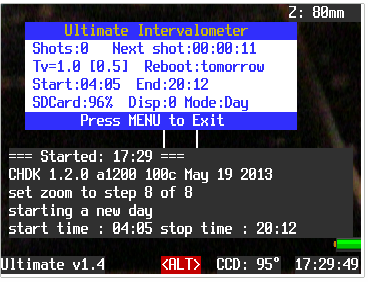
No apology necessary - it's always good to get feedback early of problems. I was just trying to point out that it was probably something specific to your situation rather than a general problem.
There are only problems with the
IXUS970?
Yes.
Thanks - that's good to know.
1. Load Script.
2. In Alt-Mode press shoot -> Script starts, four lines of Results appear, one photo is taken and reviewed.
3. the camera seems to be frozen.
4. menu button pressed, screen stays with the already taken picture (and nothing else). Nothing else happens. (like frozen)
5. Review button pressed: immediatly i can see the four result-lines and the next photo is taken.
but from now on there is nothing going on automatic.
Sometimes the result lines are a little bit dearranged and show: shot in auto mode, meter reading invalid.
6. when I press print-button(Alt-key) the result lines disappear. (but the photo is still on the screen and
nothing else)
I cannot go back in Alt-mode
pressing review button reboots the camera.
Based on this description and the photo you posted, I think that I know what might be happening.
When the script tries to take a shot, it simulates a "half press" on the shutter button in order to read the current exposure values. If the camera is unable to set the exposure or unable to focus then the script just hangs there waiting for the camera to finish doing that. There is a timeout built-into the script but that takes quite a while to activate. So it looks like the script is "hung" or "stuck" when in fact it is just waiting for an exposure reading to finish.
This situation seems to happen when there is not enough light to take a good image. This is normally never a problem when shooting outdoors but might be when testing the script at your desk in the evening. 😉
When this happens, if you just leave the camera alone it should eventually take a shot and then display a message similar to the one in the image you posted. Typically it will then be behind in time for the next shot, so it will immediately try to take the next shot. Which will also hang if there is not enough light. The cycle repeats and the script appears to be "broken".
Does this seem like what you might be seeing? Point the camera out a window in the day time and I suspect you will no longer see the problem. I'll see if I can improve how the script reacts in this situation.
I will try to make a fresh copy of CHDK and the script in the evening.
It will not hurt to try this but I don't think there is anything wrong with your CHDK installation or how the script is installed.